Introduction
A successful website normally begins long before anyone chooses colors, creates a homepage concept or writes code. Website Planning is the stage where a business decides what the website needs to achieve, who it must serve, what information it must contain, and which functions are genuinely necessary. When these decisions are postponed until design or development, the project can become a series of late changes: pages are added after layouts are approved, integrations appear halfway through development, content arrives too late, and important customer journeys are discovered only during testing.
After more than 26 years of designing and developing websites for organizations in Singapore, we have learnt at Elves Lab that clarity at the beginning makes almost every later decision easier. Good Website Project Planning does not mean predicting every detail before work starts. It means creating a strong enough foundation for strategy, UX, content, design and development to move in the same direction. This Website Planning Guide covers the practical decisions businesses should make before building or redesigning a website in 2026.
Key Takeaways
In this Website Planning Guide, you will learn:
- How to define clear business objectives before building a website
- How to identify your target audience and plan important customer journeys
- How to structure your sitemap, navigation and website content
- Why SEO, responsive design and UX should be considered during Website Planning
- How to plan website functionality, CMS requirements and integrations
- What to prepare for website budgeting, development, testing and launch
- How proper Website Planning can reduce delays, unnecessary costs and future rework
1. Start With the Business Objective
The first Website Strategy question should not be “What should the website look like?” It should be “What must the website help the business accomplish?” A corporate website may need to generate qualified enquiries, strengthen credibility with procurement teams, explain complex services, support recruitment or reduce repetitive customer questions. An ecommerce website may prioritize product discovery and transactions, while an information-led website may place greater emphasis on findability and accessibility. A website can support several goals, but the team should agree which outcomes are most important.
| Business Objective |
Website Requirement |
Possible Conversion |
| Generate enquiries |
Clear service pages and enquiry paths |
Contact form / quotation request |
| Build credibility |
Projects, credentials and testimonials |
Project view / contact |
| Support recruitment |
Careers and company information |
Job application |
| Sell products |
Product discovery and checkout |
Purchase |
| Reduce support enquiries |
FAQs and support resources |
Self-service resolution |
At Elves Lab, we prefer to establish purpose before discussing features because functionality should earn its place by supporting a customer or business requirement. This approach also forms an important part of our Website Design Services in Singapore, where business objectives, customer requirements, UX and functionality are considered before detailed design and development begin.
2. Identify the People Who Will Use the Website
Businesses naturally understand their own departments, products and terminology, but customers may organise the same information very differently. Website Planning should identify the main audience groups and what each group is trying to accomplish. For a B2B organisation, visitors might include prospective customers, existing customers, procurement teams, business partners, job applicants and media contacts. Each group may arrive with different questions, levels of knowledge and reasons for trusting the organisation.
Create simple audience profiles based on information that can influence the website: what the visitor needs, what may prevent action, what evidence builds confidence and which task matters most. Avoid inventing elaborate personas that do not change a design decision. Understanding these users is also an important part of Website User Experience, because navigation, content hierarchy and calls-to-action should reflect how customers use the website rather than mirroring an internal organisation chart.
Key takeaway: Plan around customer needs, not only internal departments.
| Audience |
Typical Need |
Planning Question |
| Potential customer |
Evaluate services |
Can they understand fit and the next step? |
| Procurement team |
Verify capability |
Are experience, credentials and projects easy to find? |
| Existing customer |
Find support |
Can they reach useful information quickly? |
| Job applicant |
Evaluate employer |
Is careers and company information current? |
3. Map the Most Important Customer Journeys
Not every visitor starts on the homepage. Someone arriving through Google may enter on a service page, read a relevant case study and request a quotation without visiting Home at all. A procurement visitor may begin with the homepage, review capabilities, examine completed projects and then locate contact information. Website Project Planning should account for these different entry points and connect pages according to the questions customers ask while planning.
Dongfeng Singapore Homepage
For each priority journey, identify what the visitor needs to understand at each stage and what a useful next action would be. A service page might lead to a relevant project, while a product page may provide different actions depending on the visitor's level of interest. For example, the Dongfeng Singapore homepage allows visitors to either “Explore More” or move directly to “Book A Test Drive”, supporting both customers who are still researching and those who are ready to take the next step. The aim is not to force everyone through one funnel. It is to remove dead ends and make the relationship between information, evidence and action clear
Customer journey example: The Dongfeng 007 homepage gives visitors different next steps based on their level of interest, allowing them to explore the vehicle further or move directly towards booking a test drive.
Google Search → Service Page → Relevant Project → Contact Page → Enquiry
4. Build the Sitemap Before Detailed Design
A sitemap is one of the most useful outputs of Website Planning because it defines the pages and relationships the design must support. Start with the major sections, then add only the supporting pages users genuinely need. For larger sites, decide whether services require categories, whether projects need filters, how articles will be organized and where industry-specific content belongs. A logical structure helps visitors understand where information lives and gives search engines clearer relationships between pages.
Review the sitemap against audience needs, search for intent, content availability and future growth. If the business expects to publish case studies, industry pages or resources over the next two years, the architecture should provide a sensible home for them. Google’s SEO guidance recommends logical site organization and useful internal links, so these relationships are worth considering while the structure is still flexible rather than retrofitting them after launch.
Key takeaway: A sitemap should support today’s requirements and tomorrow’s content growth.
| Section |
Primary Role |
Content to Prepare |
| Home |
Orient visitors |
Value proposition, priority routes, trust |
| Services |
Explain capabilities |
Service copy, process, FAQs |
| Projects |
Demonstrate experience |
Project summaries, imagery, outcomes |
| Resources |
Build useful topical depth |
Guides, articles, FAQs |
| Contact |
Enable action |
Form, contact details, expectations |
5. Plan the Content Before It Becomes a Bottleneck
Website Content Planning is often underestimated because teams assume brochures, presentations or an old website can simply be transferred into a new layout. Website content has a different job: it needs to answer customer questions clearly, support scanning, establish credibility and guide action. Before design begins, create a content inventory showing what can be retained, what needs rewriting, what is missing and who is responsible for supplying service information, photographs, projects, testimonials, certifications and legal material.
Website Content Planning Inventory
| Page |
Existing Content |
Action Required |
Content Owner |
| Homepage |
Existing website |
Rewrite |
Marketing |
| About Us |
Company profile |
Update |
Management |
| Service Pages |
Partial |
Expand |
Subject expert |
| Projects |
Available |
Reformat |
Marketing |
| FAQs |
Missing |
Create |
Customer service |
| Contact |
Existing |
Verify |
Administration |
Elveslab Website Services Page
Content should influence layout rather than merely fill it. A detailed technical service page requires a different structure from a short campaign page. A portfolio needs strong imagery and enough context to demonstrate experience, while an About page may need a clear company story and credentials. When representative real content is available early, designers can establish hierarchy around genuine information instead of relying on
Website content planning example: The Elves Lab Website Development page organizes service information into clear content sections, combining headings, supporting copy, service categories and imagery to help visitors understand the offering progressively.
6. Plan SEO Before Design and Development Lock the Structure
SEO is easier to build into a website than bolt onto it. During Website Planning, map important search themes to the pages that best satisfy them, define descriptive URLs, plan heading structures and identify contextual internal links. A core service page may target commercial intent, while supporting guides can answer research questions and link naturally to the service. This creates a clearer content cluster than publishing disconnected articles after launch.
Keyword research should guide language without making the copy unnatural. Google explicitly recommends helpful, reliable, people-first content and says its systems can understand variations in how people search. For Elves Lab, that means using Website Planning, Website Strategy and related phrases when they genuinely describe the subject, while adding first-hand project insight and useful explanations. There is no SEO benefit in forcing every keyword into every section.
Website Planning should also identify pages that may compete for the same search intent. Creating several pages around very similar keywords without a clear difference in purpose can make the website architecture unnecessarily repetitive. Each important page should therefore have a defined audience, search intent, primary topic and role within the wider website structure. This makes future content expansion easier because new articles and landing pages can support existing commercial pages rather than unintentionally duplicating them.
Website structure also affects how easily visitors move between related information. Read our Website UX Guide for a deeper explanation of navigation, hierarchy and user journeys.
7. Define What the Homepage Must Communicate
The homepage is important, but it should not be expected to contain every message. Website Strategy should establish what a first-time visitor needs to understand quickly: who the organization is, what it provides, why it is credible and which routes deserve priority. Depending on the business, the hierarchy might lead with services, products, industries, projects, appointments or public information. These decisions should be made before visual design begins.
West Coast Jurong West Town Homepage
Our work across corporate, automotive, healthcare and public-sector websites has shown that there is no universal homepage formula. For example, a public-facing website such as West Coast-Jurong West Town Council needs to help residents identify their community and reach frequently used information and services efficiently. An automotive customer, on the other hand, may want to explore vehicle models immediately, while a corporate procurement visitor may look first for capabilities, experience and completed projects. Homepage Design should therefore follow audience priorities, not a fashionable template. The visual design can then use typography, imagery, spacing and calls-to-action to express that hierarchy.
Homepage planning example: The West Coast-Jurong West Town Council homepage prioritises community identification, essential contact information, services and quick access to frequently used information.
8. Document Functional and Integration Requirements
Website Requirements Planning should distinguish essential functionality from features that are simply interesting. Document forms, search, filters, member areas, ecommerce, booking, calculators, multilingual content, document libraries, maps and other interactive requirements. For each function, state who uses it, what problem it solves, what information it receives or returns and what should happen after the user completes an action. This gives developers enough context to estimate complexity accurately.
Integrations need the same level of clarity. “Connect to our CRM” is not a complete requirement: the team needs to know which data is transferred, in which direction, when it moves, how errors are handled and who controls the third-party system. Identifying these dependencies during Website Project Planning can expose API, access, security and workflow questions before they become development surprises.
Key takeaway: Describe what each feature must accomplish, not merely what it is called.
Functional Requirements Table
| Requirement |
Define Early |
Possible Dependency |
| Enquiry form |
Fields, routing, validation |
Email / CRM |
| Search |
Indexed content and filters |
CMS structure |
| Multilingual |
Languages and translation ownership |
Content workflow |
| Ecommerce |
Catalogue, payment, fulfilment |
Payment / ERP |
| Member area |
Roles, permissions, data |
Authentication |
9. Choose the CMS Around Real Publishing Needs
A content management system should match the people who will operate the website and the content they need to maintain. Identify which sections must be editable, who will edit them, whether different permissions are required and whether structured content such as projects, articles, products or team profiles should be managed separately. A CMS is most useful when routine updates are straightforward without exposing unnecessary technical complexity.
Elveslab CMS Page
At Elves Lab, we approach CMS decisions from project requirements rather than assuming every organization needs the same platform. Website Requirements Planning should cover administrator roles, media management, metadata, redirects, content status and future modules. This helps the backend remain practical after launch and avoids designing an administration experience around features the client does not need.
Custom CMS example: The Elves Lab content management system provides administrators with a structured interface for managing website content and monitoring recent content updates.
10. Plan Mobile, Accessibility and Performance Together
Responsive behaviour should be considered while pages and functionality are being planned, not checked only after desktop layouts are finished. Google uses the mobile version of a site for indexing and ranking and recommends responsive web design as an easy pattern to implement and maintain. Website Planning should therefore consider how navigation, tables, forms, filters, large media and calls-to-action work on smaller screens rather than merely shrinking a desktop layout.
Accessibility and performance deserve the same early attention. WCAG 2.2 provides current guidance for making web content more accessible, while Google’s Core Web Vitals focus on loading performance, responsiveness and visual stability. Heading structure, keyboard interaction, form labels, colour contrast, image alternatives, media weight and third-party scripts can all be influenced by early design decisions. Treating these as requirements from the start usually produces a more usable result than attempting to repair them just before launch.
11. Decide What Will Build Trust
A website can claim to be experienced, professional or innovative, but visitors usually need evidence before those claims carry weight. Website Content Planning should identify the trust signals available to the organisation: completed projects, case studies, genuine testimonials, years of experience, certifications, team expertise, client sectors and clear contact information. The right evidence depends on the audience and should appear near the decisions it supports.
Elveslab Portfolio Page
For a website agency, a portfolio is particularly important because design and development are applied disciplines. Elves Lab can draw on more than 26 years of website work in Singapore, but experience is more persuasive when it is demonstrated through real projects, practical lessons and a clear process rather than repeated as a slogan. This is also an E-E-A-T opportunity: show who created or reviewed the content, why they are qualified to discuss the topic and where readers can verify the organisation’s work.
Website trust-building example: Elves Lab's portfolio demonstrates experience through completed website projects across different industries, giving prospective clients visible evidence of the agency's design and development capabilities.
12. Define Analytics and Conversion Measurement
Before launch, decide what success will be measured. Website Strategy may identify enquiries as the primary objective, but analytics planning should specify which actions count completed contact forms, quotation requests, phone clicks, WhatsApp interactions, appointment requests, downloads or ecommerce transactions. Secondary behaviours such as service-page engagement or project views can provide context, but measurement should stay connected to meaningful business outcomes.
Planning measurement early allows the development team to implement events, confirmation states and consent requirements correctly. It also gives the organisation a baseline for improvement after launch. Data should inform decisions rather than replace customer understanding: a high exit rate is not automatically a problem if the visitor finds exactly what they need. The useful question is whether the measured behaviour reflects the intended customer journey.
13. Include Security, Privacy and Ownership in the Plan
Security requirements vary according to functionality and data, so they should be discussed during Website Requirements Planning rather than added as a generic launch item. Identify what personal information is collected, where it is sent, who can access the CMS, what third-party services are involved and how backups, maintenance and account access will be handled. Ecommerce, customer accounts and integrations introduce additional data flows that should be understood before implementation.
Operational ownership matters as much as technology. Decide who controls the domain, hosting, analytics, third-party accounts and administrator credentials, and document how access will be transferred when staff or suppliers change. For Singapore organisations, privacy obligations should be reviewed with the appropriate internal or professional advisers rather than assuming a standard privacy-policy page resolves every requirement.
14. Set a Realistic Budget, Timeline and Approval Process
A website budget should reflect scope and complexity rather than visible page count alone. Custom UX, content production, photography, animation, ecommerce, integrations, multilingual content, accessibility work, migration and security can all affect effort. A Website Planning Checklist should separate essential launch requirements from future enhancements so the project can protect the core customer experience when budget decisions are needed.
Website Scope Factors That Can Affect Budget
| Scope Factor |
Lower Complexity |
Higher Complexity |
| Design |
Template-led layouts |
Custom UX/UI |
| Content |
Client-supplied |
Copywriting / photography |
| CMS |
Basic page editing |
Custom structured modules |
| Functionality |
Standard forms |
Booking / member systems |
| Integrations |
Minimal |
CRM / ERP / APIs |
| Languages |
Single language |
Multilingual |
| Migration |
Small website |
Large content / URL migration |
The timeline should account for work outside design and development. Content approvals, photography, legal review, stakeholder feedback, data preparation and access to third-party systems can become the real critical path. Identify the project owner, final approver, content owners and technical contacts at the beginning. At Elves Lab, we find that a clear feedback route is more valuable than having many reviewers commenting independently on the same screen. For a deeper explanation of how scope, functionality, content, UX and technical requirements influence project pricing, read our Website Cost Guide.
Key takeaway: Budget and schedule for dependencies, approvals and content—not only production time.
Project Responsibility Table
| Workstream |
Owner to Confirm |
Risk if Late |
| Content |
Marketing / subject expert |
Design waits for real copy |
| Approvals |
Project sponsor |
Conflicting or delayed feedback |
| Integrations |
IT / system vendor |
Unknown access or API constraints |
| Privacy / legal |
Relevant adviser |
Rework or launch delay |
| Domain / DNS |
IT / administrator |
Launch access unavailable |
15. Prepare a Website Brief That Suppliers Can Actually Use
Bring the decisions from Website Planning into a concise project brief. It should cover objectives, audiences, sitemap, priority journeys, content responsibilities, functionality, integrations, CMS needs, SEO, accessibility, analytics, security, budget, timeline and launch expectations. The brief does not need to prescribe every design decision. Its purpose is to give the agency and internal stakeholders a shared definition of the problem, scope and constraints.
A clearer brief also makes quotations easier to evaluate because suppliers are responding to a more consistent requirement. The website cost guide used as a reference for this article makes the same point from a pricing perspective: requirements such as UX, CMS, integrations, content and testing can materially change scope. Website Project Planning therefore improves not only the finished website but also the quality of the commercial discussion before work begins.
Key takeaway: A good brief defines the problem and requirements without trying to design the solution in advance.
A practical website brief should answer five questions:
1. Why are we building the website?
Business objectives and expected outcomes.
2. Who is the website for?
Priority audiences and their requirements.
3. What must the website contain?
Pages, content, functionality and integrations.
4. What constraints must the project work within?
Budget, timeline, technology, accessibility and approvals.
5. How will success be evaluated?
Conversions, analytics, search performance and post-launch objectives.
16. Plan Migration, Testing and Launch Before the Final Week
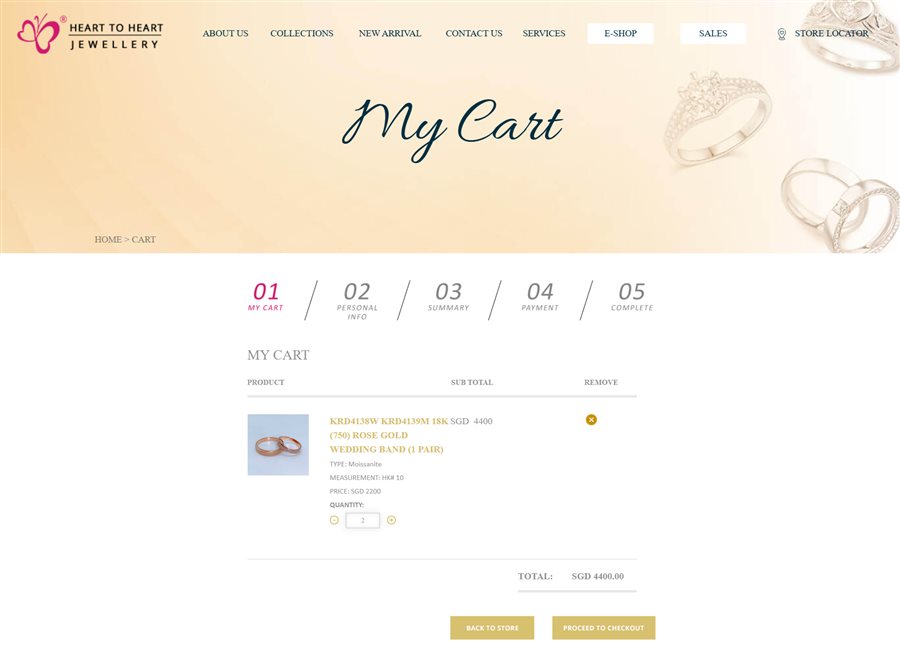
Heart to Heart Jewllery Cart & Checkout
A pre-launch review should cover content, links, forms, responsive layouts, browser behaviour, accessibility basics, performance, tracking, security configuration and backups. For ecommerce websites, testing should extend across the complete purchasing journey, from product selection and cart updates through customer information, order review, payment and confirmation.
Content Freeze → Migration → Redirect Validation → QA → Analytics Verification → DNS/Launch → Post-Launch Monitoring
Ecommerce QA example: The Heart to Heart Jewellery checkout journey demonstrates why transactional functionality should be tested from beginning to end before launch. Product details, selected options, quantities, pricing and cart updates should remain accurate as customers progress through personal information, order summary, payment and completion stages.
Caption: Heart to Heart Jewellery ecommerce cart showing product details, quantity controls and a structured five-stage checkout journey.
Why this matters: Individual ecommerce features may work correctly in isolation while problems between stages can still prevent a completed purchase. End-to-end QA helps identify issues across the cart, customer information, order summary, payment and confirmation process before launch.
For a redesign, prepare a redirect plan for URLs that will change and map important legacy URLs to the most relevant new destinations using appropriate permanent redirects such as 301 redirects. Confirm which existing content must be retained and decide how forms, page titles, meta descriptions, canonical tags, structured data, analytics and XML sitemaps will be checked. Obtain domain and DNS access early rather than discovering on launch day that credentials are missing. Where content is being migrated, agree a freeze or cut-off process so updates are not lost between the old and new websites.
Businesses replacing an existing website should also review our Website Redesign Guide for signs that indicate whether targeted improvements, a revamp or a more comprehensive redesign may be appropriate.
17. Plan What Happens After Launch
A website is not finished simply because it is live. Website Strategy should include how services, projects, articles, team information and other important content will stay accurate. Decide who owns routine publishing, who handles technical maintenance, how enquiries are monitored and how frequently analytics and search performance will be reviewed. Without ownership, even a well-built website can gradually become outdated.
Plan improvement around evidence rather than redesigning sections whenever a new trend appears. Customer questions, search data, form completion, usability observations and business changes can reveal where updates are useful. This is also where a strong content cluster becomes valuable: new resources can support existing service pages through relevant internal links, while case studies provide fresh proof of experience. Website Planning therefore continues after launch as a cycle of maintaining, learning and improving.
| Post-Launch Area |
What to Monitor |
| Content |
Accuracy and freshness |
| SEO |
Rankings, indexing and organic traffic |
| Conversions |
Forms and key actions |
| Performance |
Core Web Vitals / loading |
| Technical |
Errors, security and updates |
| UX |
Customer friction and feedback |
Website Planning Checklist Before Requesting a Website Quotation
Use this Website Planning Checklist to turn assumptions into decisions before speaking to a website company. It will not replace discovery, but it will help your team provide a clearer starting point and make quotations easier to understand.
| Area |
What Should Be Prepared Before Development |
| Business Objectives |
Business objectives and primary conversions are agreed. |
| Target Audience |
Priority audiences and customer questions are documented. |
| User Journeys |
Important user journeys are mapped. |
| Sitemap |
A draft sitemap and page inventory are prepared. |
| Website Content |
Content owners and missing content are identified. |
| SEO |
Primary SEO themes are mapped to suitable pages. |
| Homepage |
Homepage priorities are agreed. |
| Functionality & Integrations |
Functional and integration requirements are documented. |
| CMS |
CMS users, permissions and publishing needs are defined. |
| Mobile & Accessibility |
Mobile, accessibility and performance requirements are included. |
| Trust & Credibility |
Trust evidence and project materials are available. |
| Analytics |
Analytics and conversion events are defined. |
| Security & Hosting |
Security, privacy, hosting and account ownership are discussed. |
| Budget & Timeline |
Budget, target timeline and dependencies are realistic. |
| Project Management |
Project owner, approver and feedback process are agreed. |
| Migration & Launch |
Redirects, migration, QA and launch responsibilities are planned. |
| Post-Launch |
Post-launch content and maintenance ownership are assigned. |
Complex ecommerce, government, enterprise or integrated platforms may require additional technical workshops, security reviews and stakeholder discovery. The value of the checklist is not that every project becomes identical; it is that the important unknowns are identified before they become expensive changes.
Completed most of the checklist?
The next step is turning these requirements into a practical project scope
Frequently Asked Questions
What is Website Planning?
Website Planning is the process of defining a website’s objectives, audiences, structure, content, functionality, technical requirements, responsibilities and launch needs before detailed design and development begin.
Why is Website Planning important?
It reduces avoidable ambiguity. Sitemap, content, integrations, CMS, SEO and approval decisions are easier to address before layouts and code depend on them.
What should be included in a Website Planning Guide or brief?
A useful brief normally covers business objectives, audiences, journeys, sitemap, content, functionality, integrations, CMS, SEO, mobile requirements, accessibility, analytics, security, budget, timeline and ownership.
When should Website Content Planning begin?
As early as possible. Content affects page count, hierarchy, layouts, SEO, photography and approvals, so leaving it until development can create rework.
Should SEO be planned before website design?
Yes. Search intent, page purpose, URLs, content clusters and internal links can influence the architecture. SEO should support useful customer experience rather than be added as a layer after launch.
How detailed should Website Requirements Planning be?
Detailed enough for stakeholders and suppliers to understand what each important function must accomplish and what dependencies exist. Complex integrations may need separate technical discoveries.
What is a common Website Planning mistake?
Starting with visual preferences or features before agreeing the website’s objectives and customer requirements. This can make later decisions subjective and increase rework.
How long does Website Planning take?
The time required for Website Planning depends on the size and complexity of the project. A straightforward corporate website may require relatively simple discovery, sitemap and content planning, while ecommerce, multilingual, government or integrated platforms may require additional stakeholder workshops and technical discovery. The objective is not to make planning unnecessarily long, but to resolve important requirements before they become expensive changes during design or development.
Conclusion – Why Website Planning Matters Before Design Begins
Website Planning is not simply paperwork that needs to be completed before design and development begin. It creates the foundation for decisions involving business objectives, customer requirements, content, sitemap structure, SEO, functionality, CMS requirements, responsive behaviour, accessibility, analytics, security, budget and launch responsibilities.
Not every website project requires the same level of planning. A straightforward corporate website may need a relatively simple sitemap, content plan and set of functional requirements, while ecommerce, multilingual, government or integrated platforms may require additional stakeholder workshops and technical discovery. The objective is not to predict every detail in advance, but to identify important requirements before they become expensive changes later in the project.
After more than 26 years working in website design and development, our approach at Elves Lab remains straightforward: understand the business, understand the customer, define what the website needs to accomplish and then determine the appropriate structure, content, design and technology.
Planning a New Website in Singapore?
If you are preparing to build or redesign a website, the next step does not necessarily need to be choosing colours, layouts or technology. A structured planning process can help identify your business objectives, priority audiences, customer journeys, sitemap, content requirements, functionality, integrations and technical considerations before detailed design and development begin.
At Elves Lab, we bring more than 26 years of website design and development experience to projects across corporate, automotive, healthcare, public-sector and other digital environments. Our website projects begin by understanding the organisation, its customers, content, functional requirements and long-term objectives before determining the appropriate UX, design and development approach.
If you are preparing a new website or reviewing the requirements for an upcoming project, explore our Website Design Services in Singapore to learn how we approach website strategy, UX, design and development, or Contact Elves Lab to discuss your website requirements and turn your Website Planning into a practical project scope.